Sehia Script: A Dual-Style Typeface for Modern Branding
There is a specific challenge in modern design: finding a script font that feels personal and handwritten without sacrificing legibility or professionalism. Many handwritten typefaces lean too far into casual graffiti, while traditional calligraphy can feel dated or overly ornate. If you are building a brand identity, packaging, or social media presence, you need a typeface that bridges the gap between artistic flair and commercial clarity. This is where Jamalodin’s latest release enters the conversation. It offers a fresh take on the connected script, providing designers with a versatile tool that adapts to various project requirements.
Visual Character and Versatility
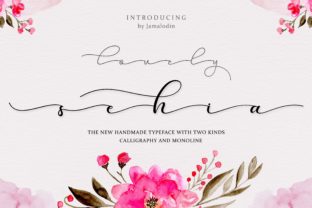
When you first examine the glyphs of this typeface, the defining characteristic is its thinness. Unlike heavy brush scripts that dominate the visual field, this font uses delicate, hairline strokes. This creates an airy, sophisticated atmosphere that allows the surrounding design elements—such as photography, textures, or negative space—to breathe. The aesthetic is decidedly modern, leaning away from the rigid constraints of traditional copperplate calligraphy while maintaining the fluidity of natural handwriting.
The true value of this specific typeface, however, lies in its dual nature. It arrives in two distinct variations: Calligraphy and Monoline. Understanding the difference between these two is crucial for any designer or business owner looking to apply them effectively.
The Calligraphy version mimics the natural pressure changes of a pointed pen. It features varying stroke widths, where upstrokes are fine and downstrokes are slightly heavier. This version is ideal for high-end branding, wedding stationery, and editorial layouts where a touch of human elegance is required. It feels organic and expressive.
On the other hand, the Monoline version strips away those pressure variations. The line width remains consistent from start to finish. This approach gives the font a cleaner, more geometric feel. It works exceptionally well for digital applications, such as website headers, mobile interfaces, and clean logo designs, where uniformity and screen readability are priorities. Having both versions in your toolkit essentially gives you two different moods to work with, allowing you to maintain a consistent brand voice across different mediums.
Strategic Applications for Branding and Marketing
Typography is not just about decoration; it is a functional tool for communication. Choosing a font like Sehia Script is a strategic decision that impacts how your audience perceives your brand. Here is how you can leverage this specific style in real-world scenarios to enhance visual consistency and engagement.
Packaging and Product Labels
For small business owners creating physical products—such as artisanal candles, skincare, or boutique foods—packaging is your silent salesperson. The thin, elegant nature of this font makes it perfect for product names that need to stand out without overwhelming the label design. The Monoline version can be particularly useful here for ingredient lists or smaller text, as it maintains clarity even at reduced sizes, whereas the Calligraphy version can elevate the main logo mark on the front of the box.
Social Media and Content Creation
Content creators and marketers often struggle with readability on busy backgrounds. Because this font is inherently thin, it offers high contrast when placed over images or video overlays. It avoids the "heavy block" look that thicker sans-serif fonts sometimes create on Instagram stories or Pinterest pins. Using this script for pull quotes or highlight headers can add a personal touch to your digital feed, making your content feel more bespoke and less templated.
Invitations and Editorial Design
The applications in print media are extensive. For event invitations, save-the-dates, or luxury menus, the Calligraphy style provides the necessary formality. In editorial design, such as magazine layouts or blog headers, it serves as a beautiful counterpoint to structured body text. It draws the reader's eye immediately, acting as an effective hook for headlines.
Pairing Typography for Professional Results
One of the most common mistakes in design is using a script font for everything. A script, no matter how legible, is generally difficult to read in long paragraphs. Therefore, the success of using Sehia Script depends heavily on its font pairing.
Because the font is thin and elegant, it pairs best with clean, neutral companions. Here are a few practical recommendations for creating a balanced visual hierarchy:
- Pair with a Sans-Serif: A geometric sans-serif font (like Montserrat, Lato, or Open Sans) provides a stable foundation. The clean lines of the sans-serif complement the organic flow of the script. Use the script for the header and the sans-serif for the body copy.
- Pair with a Serif: For a more classic, editorial look, combine the script with a modern serif font. This works well for fashion blogs, lifestyle branding, and high-end marketing materials.
- Contrast Weights: Since the script is thin, ensure your secondary font has enough weight to create contrast. If you pair it with another thin font, the design may look washed out or difficult to read on screen.
When testing your pairings, always check the hierarchy. The viewer should know where to look first. Typically, the script font should be the accent—the "spice" of the design—while the supporting font carries the bulk of the information.
Practical Considerations for Usage
Before integrating any new typeface into your workflow, there are a few technical and practical elements to review. First, consider the licensing. If you are using this font for a client project, merchandise, or an app, you must ensure you have the correct commercial license. Most premium fonts distinguish between desktop use (for print and logos) and web use (for CSS embedding). Always review the license agreement to avoid copyright issues down the line.
Second, pay attention to spacing and sizing. Thin fonts can sometimes disappear if used at too small a size, particularly on low-resolution screens. Test your designs on both mobile and desktop devices. If you are using the Monoline version for a logo, try reducing the size to the size of a favicon to ensure the letters don't merge into an unreadable blob.
Finally, explore the full character set. High-quality premium fonts often include alternates, ligatures, and swashes. These extra characters allow you to customize the look of specific words, ensuring that your typography feels unique rather than generic. By swapping out a standard "t" for a stylistic alternate, you can prevent repetition and add a subtle layer of craftsmanship to your design.
Ultimately, the goal of any creative asset is to solve a visual problem. Whether you are designing a logo for a new startup, laying out a menu for a restaurant, or creating graphics for a marketing campaign, the tools you choose matter. This elegant script offers a modern, flexible solution that balances artistic expression with the practical demands of contemporary design. It proves that you don't need heavy, loud typography to make an impact; sometimes, a delicate, thoughtful line is all it takes to capture attention.